Mimic – AI Photo Face Animator
ScaleUp
Jan 27, 2022
Dec 20, 2024
84.26 MB
2.1.1
7.0
5,000,000+

Description
Mimic – AI Photo Face Animator APK for Android
Bring your photos to life with Mimic – AI Photo Face Animator, the revolutionary face animation app powered by artificial intelligence. Whether you want to create fun animated videos, revive old portraits, or generate viral social media content, Mimic offers an effortless and entertaining experience for all users.
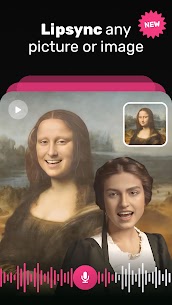
Mimic uses advanced AI face detection and animation tools to add realistic movements, expressions, and lip-sync to still images. Turn a single selfie or portrait into a lifelike video with just a few taps—no design skills required!
🎥 What is Mimic – AI Face Animator?
Mimic is an innovative app that lets users upload static photos and transform them into animated videos. It simulates facial expressions like smiling, blinking, speaking, or even singing. Perfect for sharing on TikTok, Instagram, YouTube Shorts, and other platforms, Mimic makes it easy to create attention-grabbing content.
The app is available in APK format for Android users and works both online and offline.
✨ Key Features of Mimic AI Photo Animator
✅ Realistic AI Animation
Animate any face in a photo with high-quality facial motion, including lip-sync, head tilts, and expressions.
✅ Voice Integration
Add audio clips or choose from the built-in sound options to sync mouth movements with your favorite songs or dialogues.
✅ Multiple Templates
Choose from trending animation templates like dancing, singing, winking, or emotional expressions.
✅ Easy to Use Interface
No editing skills needed—upload, pick an effect, and export. That’s it!
✅ High-Resolution Export
Save your animated videos in HD quality, ready for posting or sharing.
✅ Safe & Secure
Your data and photos stay private; the app doesn’t store user content without permission.
📱 How to Use Mimic APK on Android
Download the Mimic APK and install it on your Android phone.
Open the app and upload a photo from your gallery.
Choose an animation effect or voice track to apply.
Preview and export your animated video in seconds.
Share your creation directly to social media or messaging apps.
Whether you’re animating your own selfies, reviving a loved one’s photo, or creating memes, Mimic is the go-to tool for AI-based face animations.
🎯 Who Is Mimic For?
Content Creators: Generate unique videos that stand out.
Social Media Users: Make funny, emotional, or entertaining content that goes viral.
Families: Animate old family photos for nostalgic fun.
Marketers: Use facial animations in creative promotions or ads.
📝 Final Thoughts
Mimic – AI Photo Face Animator is more than just an editing app—it’s a tool that adds life, emotion, and personality to your photos. With its powerful AI engine and easy-to-use design, anyone can create professional-level animated content in moments.
Download the Mimic APK for Android now and start animating your world, one photo at a time. Whether for fun, content, or creativity, Mimic turns imagination into animation.
Download links
How to install Mimic - AI Photo Face Animator APK?
1. Tap the downloaded Mimic - AI Photo Face Animator APK file.
2. Touch install.
3. Follow the steps on the screen.
What's new
Bug fixes and improvements
Images